Why this matters in 2026
Most small businesses struggle to get real online visibility. You launch a site, post on social, maybe boost a few ads—yet inquiries trickle in. The problem isn’t your effort; it’s that customers can’t find you or trust you fast enough.
That’s why a small business WordPress website paired with solid SEO for small businesses is the winning combo for 2026. WordPress gives you control, flexibility, and room to grow; SEO aligns every page with what people actually search for—so the right visitors land on the right pages and take action. Together, they turn your site from a digital brochure into lead-generation web design that works while you sleep.
In this guide, you’ll see:
-
The biggest website mistakes to avoid,
-
a no-fluff WordPress vs Wix SEO comparison,
-
and practical tips to turn more visits into calls, messages, and sales.
Short, clear steps. Plain language. Real examples you can apply today—so your small business can grow online with confidence.
Why Every Small Business Needs a WordPress Website with SEO
A small business WordPress website gives you three things you don’t get from many “site builders”: flexibility, ownership, and growth-ready SEO. You control your domain, hosting, theme, and plugins—so your site can start lean and evolve as your business grows.
Flexibility you actually own
-
No lock-in: Move hosts, change designs, add features anytime.
-
Fits your model: Service pages, product catalogs, bookings, memberships, courses—WordPress can handle it.
-
Budget-friendly scaling: Start simple, add only the plugins you need as revenue grows.
Plugins & integrations that cut costs
-
Accept payments, run bookings, capture leads (forms/CRM), add popups, chat, analytics—often without custom code.
-
Need local SEO, multilingual content, or email automation? There’s a mature plugin ecosystem for that.
Built for SEO from the ground up
-
Clean structure: Customizable permalinks, proper heading hierarchy, categories/tags.
-
Fast indexing: Auto XML sitemaps, easy Search Console integration.
-
On-page helpers: Title/meta editing, schema markup, image alt text—right where you write.
-
Performance options: Caching and CDN tools to help meet Core Web Vitals (speed = higher trust and conversions).
Proof it’s a safe bet: Over 43% of all websites run on WordPress—there’s a reason businesses and publishers rely on it.
Why this matters for “WordPress SEO for business”
When SEO is baked into how you publish, every new page can target a problem your customer is searching for—and be technically sound. That means: clearer rankings signals, more qualified traffic, and a site that turns visits into calls, messages, and sales.
Quick wins to launch SEO-ready
-
Pick a lightweight, mobile-first theme; set pretty permalinks (
/service-name/). -
Install a reputable SEO assistant plugin; set site title, meta defaults, and sitemap.
-
Create focused service pages (one service = one page) with a clear “Book/Call” CTA.
-
Add local signals: NAP (name, address, phone) in the footer, Google Map on Contact, and LocalBusiness schema.
-
Connect Google Search Console & Analytics; track calls/forms as conversions.
-
Publish one helpful article a month targeting a real question (FAQ keywords).
If you want a setup that’s SEO-ready from day one, see our Small Business WordPress Web Design Services—we’ll handle the build, core SEO settings, and a launch checklist so you start strong.
Top 10 Common Small Business Website Mistakes (and how to fix them)
These small business website mistakes quietly drain traffic and leads. The good news: most are easy wins with smart WordPress optimization and a simple SEO setup.
1) Using generic templates (no branding)
What it looks like: stock theme colors, vague headlines, identical layouts as competitors.
Why it hurts: visitors don’t remember you; Google sees thin, interchangeable pages.
Fix: pick a lightweight theme, then customize your color palette, typography, and imagery; write a one-line value proposition at the top of every key page (“We do X for Y in Z”).
2) No SEO or keyword plan
What it looks like: random blog topics, service pages that don’t match searches.
Why it hurts: you rank for nothing specific.
Fix: choose one primary keyword per page (e.g., “emergency plumber in Lahore”), add 4–6 related phrases, and answer 2–3 FAQs. Map: one service = one page.
3) Slow loading pages
What it looks like: heavy images, bloated page builders, 10+ plugins.
Why it hurts: users bounce; search visibility slips.
Fix: compress/resize images, enable caching + CDN, remove unused plugins, and prefer a performance-first theme. Test speed after every plugin install.
4) No mobile optimization
What it looks like: tiny text, pinching to zoom, buttons too close.
Why it hurts: Most visitors are on phones; poor UX kills conversions.
Fix: use a responsive theme, set base font ≥16px, add generous spacing, and test real devices. Put the primary CTA (Call/WhatsApp/Book) above the fold on mobile.
5) Missing a clear call to action
What it looks like: only a contact page, no obvious next step.
Why it hurts: users leave without acting.
Fix: place one primary CTA per page (e.g., “Get a Free Quote”), repeat it near the top, mid-page, and bottom. Make buttons clear, large, and specific.
6) Weak content or stock images
What it looks like: generic copy, clichés, overused stock photos.
Why it hurts: low trust; no reason to pick you.
Fix: replace stock with real photos (team, work, location). Add specifics: prices/starting rates, timelines, processes, checklists, before/after, mini case studies with outcomes.
7) No Google Analytics (or conversions) set up
What it looks like: traffic guesses; you don’t know what’s working.
Why it hurts: You can’t improve what you don’t measure.
Fix: connect GA4 and Google Search Console; track form submits, phone clicks, and WhatsApp/chat as conversions. Review monthly: top pages, queries, and where users drop.
8) Ignoring local SEO
What it looks like: no Google Business Profile, inconsistent name/address/phone.
Why it hurts: you miss local map results (high-intent leads).
Fix: verify and complete your Google Business Profile, keep NAP consistent site-wide (footer + contact), embed a map, list service areas, and earn a steady stream of reviews.
9) DIY hosting mistakes
What it looks like: unreliable shared hosting, no backups, no SSL.
Why it hurts: downtime, security warnings, lost rankings.
Fix: choose reputable hosting with free SSL, daily backups, and staging; turn on automatic updates for minor versions and keep PHP up to date.
10) No ongoing maintenance
What it looks like: outdated plugins, broken links, stale content.
Why it hurts: security risks and gradual traffic decline.
Fix: monthly checklist—update core/theme/plugins, check forms, fix 404s/redirects, refresh top posts, and add one new helpful article answering a real customer question.
Each of these issues can be solved through a WordPress site built with SEO in mind—clean structure, fast performance, focused pages, and clear actions that turn visitors into leads.
WordPress vs Wix for Small Business SEO
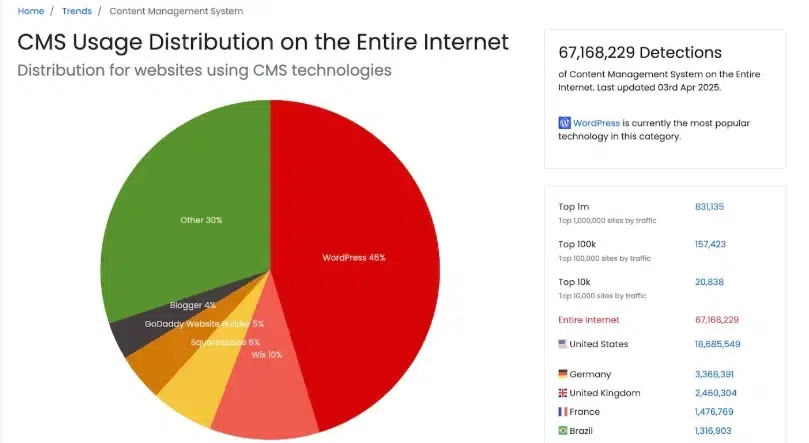
TL;DR: If you need long-term growth, advanced SEO control, and the freedom to scale or switch tools, WordPress is the best platform for a small business. Wix is simpler to start but offers less depth and portability.
Quick comparison
| Area | Wix | WordPress |
|---|---|---|
| Ease of use | Very beginner-friendly; visual editor; low setup. | Short setup + a learning curve; still easy day-to-day once configured. |
| Customization | Templates + apps, but guardrails limit deep changes. | Full control over themes, blocks/builders, and code when needed. |
| SEO controls | Solid basics (titles, metas, redirects, sitemap) but fewer advanced levers. | Granular SEO with plugins (Yoast, Rank Math): schema, breadcrumbs, redirects, canonical rules, robots.txt, and more. |
| Performance | Managed hosting; speed is “good enough,” fewer tuning knobs. | Choose fast hosting; add caching/CDN and image optimization for Core Web Vitals wins. |
| Ownership & portability | Hosted, closed ecosystem; harder to migrate. | You own hosting + files; easy to move, back up, or scale. |
| Scalability | Fine for small sites; custom flows can hit walls. | Grows from 5 to 5,000+ pages; flexible content models, roles, and workflows. |
| Total cost over time | Predictable subscription; can rise with add-ons. | You pick hosting + only the plugins you need; cost efficiency improves as you scale. |
Ease of use: simple vs. customizable
-
Wix: Great for a first site. Drag-and-drop, fewer decisions, quick launch.
-
WordPress: Slightly more setup, but you gain a durable structure (custom post types, reusable blocks, scalable menus) that makes ongoing content work faster—not slower.
SEO depth: “good basics” vs. “granular control”
-
Wix: Covers essentials (titles, meta, 301s, sitemap, basic schema).
-
WordPress: With Yoast or Rank Math, you can manage advanced schema (per page/post type), custom breadcrumbs, canonical rules, redirect maps, internal-link suggestions, and fine-tuned XML sitemaps—exactly what helps competitive pages rank.
Ownership & scalability: who holds the keys?
-
Wix: You’re within a hosted garden; migrations can be painful.
-
WordPress: You own your site and database. Switch hosts, redesign, or add new functionality without starting over—ideal for growing teams and content libraries.
Cost: value as you grow
-
Wix: Simple monthly pricing; convenient at the start. Add-ons can nudge the bill up as needs expand.
-
WordPress: You choose hosting, then layer only the features you truly need. Over time, this flexibility typically yields better value for growth-minded businesses.
Practical guidance
-
Choose Wix if: you need a basic brochure site fast, with minimal ongoing changes.
-
Choose WordPress if: you want to rank for competitive terms, publish consistently, track conversions deeply, and keep your options open (design, features, hosting, migration).
Bottom line: Wix works for hobby sites, but for serious business growth, WordPress + SEO is the clear winner.
How to Design a Small Business Website that Brings Leads
You don’t need a flashy site—you need a lead generation website that makes it easy for the right visitor to contact you. Use these small business web design tips to build a page that converts.
Start with your goal (customer action)
Decide on the one action you want most: Call, WhatsApp, Book a slot, or Request a quote.
How to implement (WordPress):
-
Make that action your primary CTA site-wide.
-
Add it to the header, hero section, and footer.
-
Track it (GA4 events for call clicks, form submits, WhatsApp taps).
Keep design simple + conversion-focused
Simple pages convert better than crowded ones.
Do: clean layout, generous white space, 1–2 brand colors, readable fonts.
Avoid: carousels, auto-playing videos, and 10+ plugins.
WordPress tips: choose a lightweight theme; limit fancy effects; use a single column for mobile.
Use clear headings & strong CTAs
Headings must say who you help and what outcome you deliver.
Hero formula: “[Service] in [City] — Get [Outcome] in [Timeframe].”
CTA examples: “Get a Free Quote,” “Book a 15-min Call,” “Check Schedule,” “Send WhatsApp.”
WordPress tips: H1 for the main promise; H2S for sections (Services, Process, Pricing, FAQs); use button blocks with consistent labels.
Optimize for speed & mobile
Fast, phone-friendly pages rank and convert better.
Speed checklist: compress images, lazy-load media, enable caching + CDN, minimize plugins, and preload key fonts.
Mobile checklist: base font ≥16px, tap-friendly buttons, sticky header CTA, short forms (name + phone + message).
WordPress tips: use a performance plugin for caching, set WebP images, and test Core Web Vitals after every change.
Add social proof (testimonials, reviews)
Show proof near the CTA and pricing.
-
3 short testimonials with before/after or a measurable result.
-
Star ratings from Google, logos of clients/partners, quick stats (“312 homes serviced in 2024”).
-
Link to your Google Business Profile for credibility.
WordPress tips: testimonial block or slider (static, not auto-scroll), review schema via your SEO plugin.
One-page lead layout (copy this wireframe)
-
Hero: Promise + primary CTA (Call/WhatsApp/Quote).
-
What you do (3 bullets): the clearest benefits.
-
Services grid: each card links to a dedicated service page.
-
Proof strip: stars, logos, short testimonial.
-
How it works (3 steps): simple process with icons.
-
Pricing/Packages or “From $X”: set expectations.
-
FAQ (4–6 items): handle objections.
-
Final CTA: repeat the main action.
Pro Tip
Combine great design with on-page SEO for real results.
For each service page, target one main query (e.g., “roof repair in Karachi”), use the phrase naturally in the H1 and first paragraph, answer 2–3 FAQs, add internal links to related services, and include your NAP (name, address, phone) in the footer. That’s how your small business WordPress website becomes discoverable and persuasive.
Do this and you’ll have a clean, fast, trustworthy lead generation website that turns visitors into calls and bookings—without gimmicks.
5 Ways SEO Helps Small Businesses Compete with Big Brands
Big brands have a budget. You have proximity, relevance, and speed. SEO for small business turns those strengths into consistent traffic and leads—without paying for every click.
1) Local SEO helps you own your area
When someone searches “near me,” Google prefers nearby, trusted businesses.
How to win local SEO:
-
Claim and complete your Google Business Profile (photos, services, hours, FAQs).
-
Keep NAP (name, address, phone) identical across your site and listings.
-
Add a Location page and embed a map; mention neighborhoods and service areas naturally.
-
Earn steady reviews and reply to each one.
-
In WordPress: add LocalBusiness schema via your SEO plugin and include NAP in the footer.
2) Long-tail keywords beat big-budget ads
You won’t outbid big brands on “plumber,” but you can rank for specific intent like “emergency plumber open late in Gulshan.”
How to capture long-tail:
-
Make one service page per service (and per city/area if relevant).
-
Answer exact questions as short posts or FAQs (“price,” “timeline,” “what to expect”).
-
Use phrases customers use on the phone or WhatsApp—those are perfect long-tails.
-
In WordPress: add an FAQ block with schema so answers can appear directly in results.
3) Quality content builds authority
Helpful, specific content earns clicks and trust—something ad budgets can’t buy.
What to publish:
-
Case studies with outcomes (before/after, time saved, cost range).
-
How-to guides and checklists your customers actually use.
-
A clear process page (3–5 steps) to reduce friction.
-
In WordPress: create a “Resources” hub; link each article to your service pages (internal links).
4) Faster loading means higher ranking
Speed is a ranking signal and a conversion booster. Big sites are often heavy; you can be faster.
Speed checklist:
-
Lightweight theme, compressed images (WebP), lazy-load media.
-
Caching + CDN; remove unused plugins and bloated page elements.
-
Test Core Web Vitals after every change.
-
In WordPress, use one reputable performance plugin and keep page builders minimal.
5) Consistent SEO creates trust and visibility
SEO compounding beats one-off campaigns. Small, steady improvements stack up.
Monthly routine:
-
Publish one useful article targeting a real question.
-
Refresh one older page (better headline, tighter intro, updated screenshots).
-
Add 3–5 internal links to relevant pages.
-
Track conversions (calls, forms, WhatsApp clicks) and fix any drop-offs.
-
In WordPress: schedule updates, run security/backup checks, and review Search Console queries.
You don’t need a big budget to win online — you just need smart SEO.
Real Examples / Case Results (Trust + Proof)
Short, real wins you can replicate. These WordPress success stories show how smart on-page work and clean builds turn into leads.
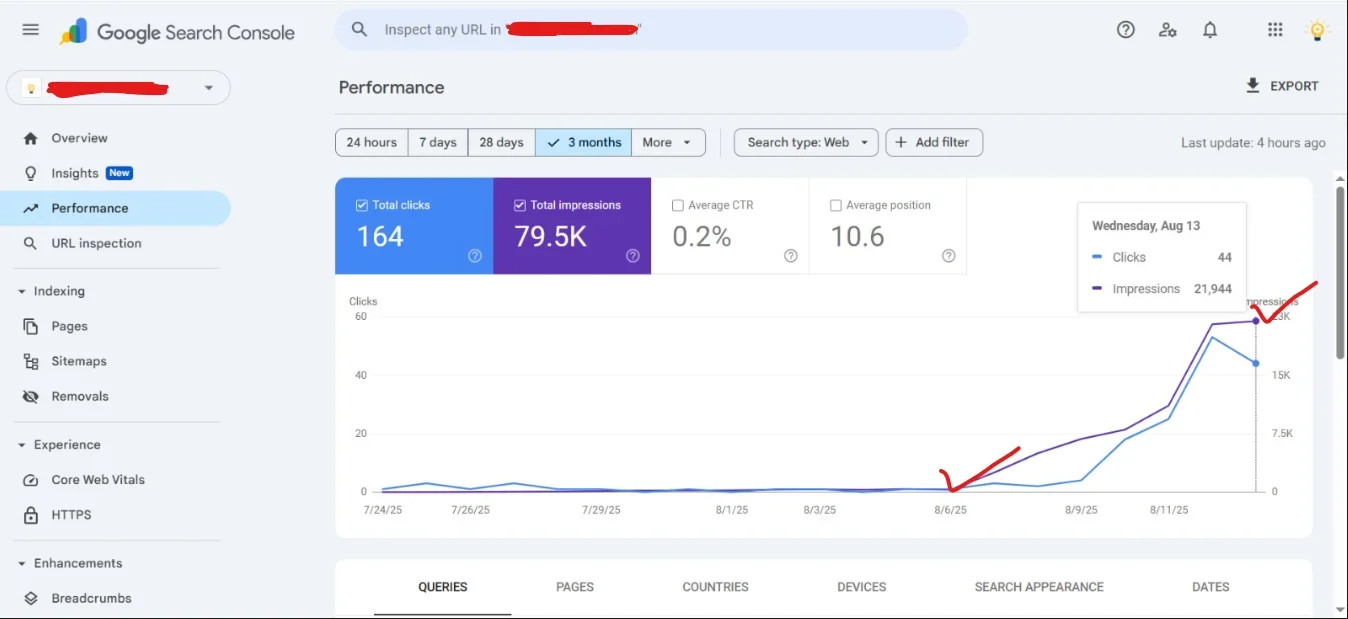
Case #1: Local store → +120% organic traffic in 90 days
Starting point: A neighborhood home-services store with a dated site and no keyword plan.
What we changed (WordPress + SEO):
-
Rebuilt on a lightweight theme; fixed Core Web Vitals (caching, WebP, lazy-load).
-
One service page per service & area (clear H1s, FAQs, internal links).
-
Added LocalBusiness schema, consistent NAP in footer, and embedded Google Map.
-
Optimized Google Business Profile (categories, services, photos, Q&A).
Results measured (GA4 + Search Console): -
+120% organic sessions (90 days post-launch).
-
+41% higher CTR on core queries; bounce rate down 18%.
-
Call clicks from mobile up 2.3×.
Takeaway: Local structure + speed + credible signals (reviews/schema) = steady, compounding traffic.
Case #2: Solo consultant → 3× qualified leads with focused landing pages
Starting point: General “Services” page; inquiries were vague and low-quality.
What we changed (WordPress + lead gen):
-
Built 2 targeted landing pages (one problem = one page) with a single CTA (“Book a 15-min call”).
-
Clear promise in the hero, social proof near pricing, short form (name, email, goal).
-
On-page SEO: primary keyword in H1/intro, 3–4 related phrases, FAQ with schema.
-
Set up conversion tracking (form submits + calendar bookings as GA4 events).
Results measured (60 days): -
3× increase in qualified consultations; conversion rate +78%.
-
Top landing page ranked for 6 long-tails within 6 weeks.
Takeaway: Intent-matched pages + frictionless CTAs turn targeted visitors into real pipeline.
Why this matters: These SEO case study small business wins aren’t about luck—they’re about structure, speed, intent-based pages, and measurement. You don’t need a giant budget; you need a WordPress build that’s SEO-ready and a simple, repeatable cadence (publish, interlink, measure, improve).
How to Get Started — Build Your SEO-Ready WordPress Website
Ready to build your own SEO-ready WordPress website?
Explore our Small Business WordPress Web Design & SEO Services and grow with confidence.
Your simple 3-step path
-
Free discovery (15 mins): goals, audience, and the #1 action you want visitors to take.
-
Mini audit & plan: sitemap, on-page SEO targets, design wireframe, timeline + quote.
-
Build & launch: fast theme, clean structure, on-page SEO (titles, metas, schema), local signals, GA4 + Search Console + conversion tracking.
What you get (standard)
-
Conversion-first design: clear headings, strong CTAs, mobile-ready layout.
-
WordPress SEO for business: proper permalinks, sitemaps, structured data, internal links.
-
Performance wins: caching, image optimization (WebP), Core Web Vitals checks.
-
Lead tracking: calls, forms, WhatsApp clicks measured from day one.
-
Ownership: your domain, your hosting, your logins—no lock-in.
Optional add-ons: GBP optimization, service-area pages, content package (FAQs, case studies), monthly care & updates.
CTA (use on page)
Wix works for hobby sites, but for serious business growth, a small business WordPress website with thoughtful SEO turns visitors into leads—consistently.
Ready? Explore our Small Business WordPress Web Design & SEO Services and grow with confidence.
FAQ — WordPress, SEO & Small Business
Quick answers to the most common questions.
Q
What makes WordPress best for small business SEO?
That means every page can target a clear intent and be technically sound without custom coding.
Q
How long does it take to see results?
Meaningful growth (traffic + leads) typically builds over 3–6 months, faster if you add local signals, useful content, and fix speed issues early.
Q
Can I migrate from Wix to WordPress?
After launch, submit your sitemap in Search Console and monitor for 404s. Done right, you preserve (and often improve) rankings.
Q
What’s the average cost of a small business WordPress website?
Costs rise with custom design, advanced features (booking, memberships), or content packages. Hosting, domain, and care plan are separate.
Q
Do you offer ongoing support and SEO?
SEO plans add content, internal links, local profile optimization, and reporting (calls/forms/WhatsApp). The goal: steady, compounding visibility and leads.
Conclusion
A smart small business WordPress website with SEO can make a small business look big, rank high, and grow fast. When your site loads quickly, answers real questions, shows proof, and guides visitors to a clear action, you don’t need a huge budget—you need a focused plan.
Quick recap:
-
WordPress gives you flexibility, ownership, and room to scale.
-
On-page SEO aligns every page with real customer intent.
-
Clean design + strong CTAs turn visits into calls, messages, and bookings.
-
Consistent updates and local signals compound results over time.
Ready to move?
Book Your Free Consultation Now — we’ll map your goals, outline the pages you need, and launch an SEO-ready WordPress site built to generate leads.